
Let an agent propose a configuration change
The agent prepares a candidate file. A trusted job validates it and saves a plan. A reviewer approves the changes shown in that plan. A separate deploy job applies the approved file.
Discover what this binary accepts
Section titled “Discover what this binary accepts”| Command | Output |
|---|---|
japka config list --json |
All supported Japka startup environment settings, accepted values, default rules, descriptions, legacy aliases, and the reloadable file schema. Changing process environment requires a restart. |
japka config schema |
Draft 2020-12 JSON Schema for the strict JSON file named by JAPKA_CONFIG. |
japka config show --json |
Validated file and environment inputs resolved into routes, HTTP pool settings, named site roots, and certificate/key paths. Routes include the ordered list of backends. The default certificate is keyed by *. |
japka config test |
Deployment preflight. Exit 1 indicates invalid inputs. Type and route validation errors can include a Serde-style diagnostics[].path, such as routes[0].upstreams[1]. |
japka config plan BASE CANDIDATE --json |
A validated comparison using the same startup environment. Exit 0 produces a version 1 plan. Exit 1 includes diagnostics. The command runs without binding listeners or sending probes. |
The configuration file schema describes the fields accepted by this revision. For an installed release, use its own japka config schema.
Run show, test and plan with the service’s binary, working directory, environment, and mounts. Show and plan read the specified inputs from disk. The service logs its accepted file digest separately. Discovery works offline and with an invalid deployment environment. The schema describes file structure. Preflight also opens site directories and checks certificate pairs, upstream definitions and listener addresses.
For the three HTTP pool settings, the environment catalog’s file_field identifies the reloadable alternative. config show includes each effective value and source in effective.proxy. A plan lists old and new values and sources in proxy.changes, including a change from an inherited value to the same value pinned in the file. Balancing and health-check fields
Add a route and keep inherited routes
Section titled “Add a route and keep inherited routes”Install Japka from any directory with Cargo’s bin directory on your path. Create a separate working directory so the site only serves public files. The example uses jq, Python 3 and two loopback ports.
cargo install --locked japkacd "$(mktemp -d)"mkdir publicprintf '{}\n' > active.jsonexport DOCUMENT_ROOT="$PWD/public"export JAPKA_CONFIG="$PWD/active.json"export LISTEN=127.0.0.1:8080export JAPKA_ROUTES='[{"prefix":"/old/","upstreams":["127.0.0.1:9000"]}]'An omitted or null routes field inherits both JAPKA_ROUTES and UPSTREAMS. An explicit array replaces both. Start from effective routes and preserve the rest of the original file.
japka config show --json > effective.jsonjq --slurpfile current effective.json \ '.routes = ($current[0].effective.routes + [{"prefix":"/api/","upstreams":["127.0.0.1:9001"]}])' \ "$JAPKA_CONFIG" > candidate.jsonJAPKA_CONFIG="$PWD/candidate.json" japka config testjapka config plan "$JAPKA_CONFIG" candidate.json --json > plan.jsonRead the review directly from the saved plan. This prints the deployment action, unaffected route count and the old and new values for each changed route, proxy setting, site and certificate reference.
jq -r '.review[]' plan.jsonThe example yields one added route, one unchanged route and a switch from inherited to file-defined routing. Manage the explicit routes in the configuration file. Reordering equivalent route entries creates no route changes. Reordering upstreams within a route appears as a modification. Formatting-only edits produce a new file digest.
Approve and apply on a native Unix service
Section titled “Approve and apply on a native Unix service”For the local example, start a backend that serves the expected response and a Japka process with a dedicated stderr log. Run the remaining commands in the same shell.
mkdir -p backend/apiprintf 'ready\n' > backend/api/readypython3 -m http.server 9001 --bind 127.0.0.1 --directory backend >backend.log 2>&1 &backend_pid=$!japka 2>japka.log &JAPKA_PID=$!In CI, have a trusted job generate the plan with the deployment inputs and save the exact candidate and plan as artifacts for the proposed revision. Show the reviewer .review[] and the SHA-256 of the saved plan. The deploy job receives the approved digest from the approval record. Keep the deploy credentials, helper and probe under the deploy job’s control.
Follow the approved file through the Unix deploy job
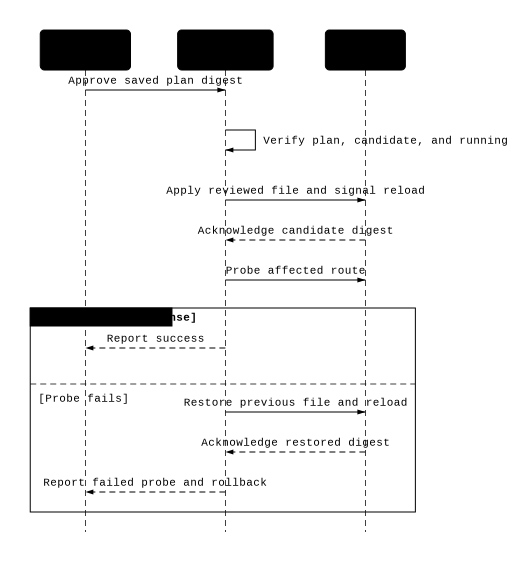
For the local example, save the Unix deploy helper as apply-config.py in the working directory. Display the digest, review the plan, then enter the digest you approved.
shasum -a 256 plan.jsonread -r APPROVED_PLAN_SHA256python3 ./apply-config.py \ --approved-plan plan.json --approved-sha256 "$APPROVED_PLAN_SHA256" \ --candidate candidate.json --pid "$JAPKA_PID" --log japka.log \ --verify python3 -c 'from http.client import HTTPConnectionconn = HTTPConnection("127.0.0.1", 8080, timeout=5)conn.request("GET", "/api/ready")response = conn.getresponse()raise SystemExit(0 if response.status == 200 and response.read() == b"ready\n" else 1)'The helper checks the running baseline, stages the approved bytes, signals Japka and waits for acknowledgement of the candidate digest. A failed probe restores the original file and waits for acknowledgement of its digest. Retrying an interrupted rollout with the same plan recovers the sibling rollback file. Use a regular config file in a trusted directory, a dedicated append-only stderr log for that service instance and a single writer for file changes and reloads. Unix deploy helper
Stop both demonstration processes when finished.
kill "$JAPKA_PID" "$backend_pid"The plan covers one JSON file under a fixed startup environment. Use immutable, versioned paths for certificates, keys and deployed assets so the contents behind each reviewed reference stay fixed. Environment edits require a process rollout. Windows also requires a restart for JSON file changes. Container and Kubernetes deployments can run the plan with their own rollout and readiness checks. Deployment guide